
































































 Author: Radomskyi Maksym Vasyliovych
If at night you have to feel around the cabin to find things and a flashlight instantly hits you in the eyes, the cause is usually not your eyesight. Most often, two things coincide: the factory interior light is either set too dim or turns on in the wrong mode, and a bright white beam instantly ruins dark adaptation and creates glare.
The right solution here isn’t to simply buy a brighter bulb. First check the dome light modes, brightness settings, and door-trigger response, and only then decide whether you need soft, local lighting in the footwells, door pockets, or glovebox.
Why this problem happens
Your eyes adapt to darkness gradually, and that takes time. Just a few seconds of harsh light is enough to ruin that adaptation: after that, even a familiar door pocket or items on the seat “drop” back into the dark. That’s why a powerful flashlight often doesn’t help—it makes things worse.
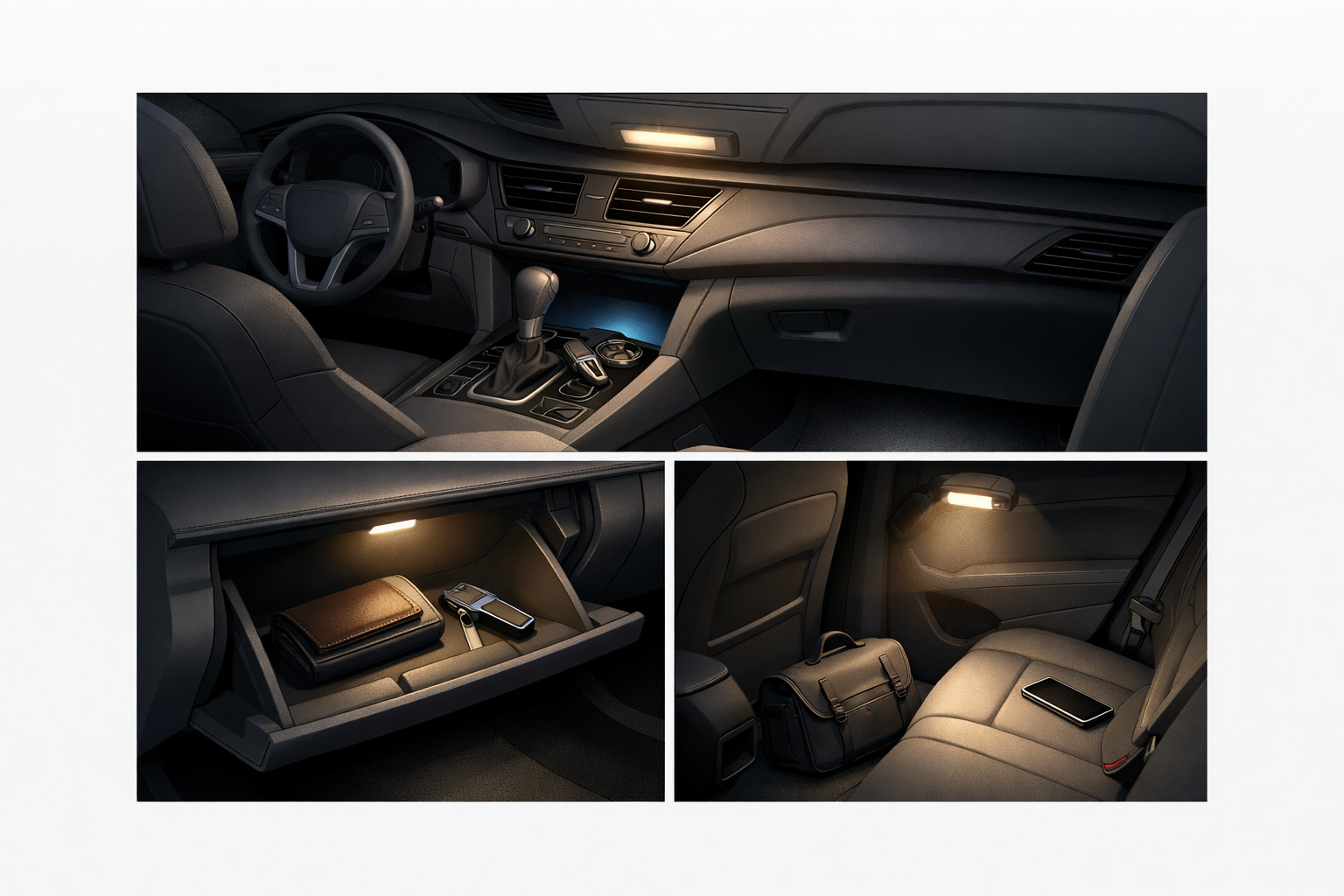
The second part of the problem is the cabin design. Black trim, deep pockets, tint, and the lack of local lighting in the footwells or glovebox make the interior look darker. As a result, the overhead dome light seems bright enough, but the area you need still stays in shadow.
Main causes
- The dome light isn’t set to door mode, or the interior lighting brightness is turned down.
- The light turns off on the factory timer, and it’s mistaken for a fault.
- A specific bulb or lighting module isn’t working.
- A door switch/sensor or latch doesn’t send a signal to turn on the interior light.
- You’re using overly bright white light to look for items, which dazzles you.
- There simply isn’t any local light where small items are stored.
How to understand what the cause is in your case
Park the car in a dark place and check everything step by step, not randomly. First unlock the car, open each door separately, and see whether the light comes on. If the dome light works manually but not from the doors, the issue is most often the dome light mode, a door sensor, or the signal from the latch.
If it’s dark only in one spot—for example, the light over the second row or in the glovebox—suspect the bulb or module. If the whole cabin is dark, check the brightness in settings, the fuse, and the activation logic. If there is light but it’s still inconvenient to find things, then the issue is no longer power—it’s poor lighting placement and brightness for the task.
Also pay attention to the shut-off time. In many cars, the interior light may turn off about half a minute after unlocking or run for a limited time in parking mode. If the scenario repeats exactly the same every time, it may be normal factory logic, not a failure.
DD Tuning expert comment: a common mistake is installing the brightest LED strip under the dashboard and expecting the cabin to become more convenient. In reality, light from above or at eye level causes glare and irritation rather than helping. For night use, dim, diffused lighting below the line of sight works better—and it must have the ability to reduce brightness.
Symptoms, causes, and what to do
| Symptom | Likely cause | What to do |
|---|---|---|
| Dome light turns on manually but doesn’t respond to the doors | Incorrect dome light mode, door switch/sensor, or latch | Enable door mode, check each door separately, then inspect the sensor or latch |
| Dark only in one area | Burned-out bulb or faulty module | Replace the specific part instead of looking for a problem in the whole system |
| There is light, but you still can’t see items | Light is too high, too harsh, or not where it’s needed | Add dim local lighting to the footwells, pockets, or glovebox |
| After using a flashlight you can’t see anything for a few seconds | Glare and loss of dark adaptation | Use the lowest brightness, warm or slightly reddish light |
| The light turns off after a short time | Factory timer or energy-saving mode | Check whether it repeats the same way each time; if yes, read the settings first instead of changing bulbs |
What really helps
What works best isn’t brighter light, but better-placed light. For finding small items at night, dim diffused lighting in the footwell area, lower door pockets, center console, or glovebox is more convenient. It doesn’t hit your eyes and illuminates exactly the place you’re looking at.
The second practical step is to set the correct brightness for the factory lighting and check all modes. Very often the problem is solved without purchases: the dome light is in the wrong position, the panel brightness is turned down to minimum, or one bulb isn’t working and creates the feeling of a “dead spot” in the dark.
For a one-off search for something small, it’s better to have a dim warm or slightly reddish light source rather than a harsh white flashlight. If there’s no other option, a brief switch-on at minimum is better than a long bright beam in your face.
What almost doesn’t work or only helps briefly
- A bright white phone flashlight: it quickly dazzles you and ruins night vision.
- Keeping the overhead dome light on all the time: it creates glare, distracts, and doesn’t always light the niche you need.
- A cheap LED strip without brightness control: it looks impressive at first, but in real use it’s often too bright.
- Trying to “beat” darkness only with a more powerful bulb: if the issue is a door sensor or timer, it won’t help.
When accessories or replacing parts makes sense
Accessories make sense when the factory system works, but there isn’t enough light in the areas you actually need. Then it’s worth looking at interior lighting with soft light, not the most powerful options. If the cabin feels dark because of how items are stored, seat-back organizers will be more useful so small things don’t get lost down low or between the seats.
If one light point isn’t working, it’s logical to replace that specific bulb or module. If the door-trigger function doesn’t work, you need to repair the sensor, latch, or wiring—not mask the problem with extra lighting. If you want to pick several practical solutions in one place, it makes sense to browse interior accessories and immediately filter out decorative items that don’t help at night.
Solutions: when they work and when it’s not worth spending money
| Solution | When it works | When it’s not worth spending money |
|---|---|---|
| Check dome light mode and brightness | When the light exists but is disabled by settings or dimmed | When a specific bulb physically doesn’t work |
| Replace one bulb or module | When only one area is dark | When the whole door-trigger logic doesn’t work |
| Repair the door switch/sensor or latch | When the dome light works manually but doesn’t respond to opening | When you simply lack local light in the lower cabin |
| Dim local lighting in the footwells or glovebox | When factory lighting works but doesn’t illuminate the search area | When the issue is a fuse, wiring, or the wrong mode |
| A bright flashlight or very powerful LED strip | Mostly only for a quick inspection during repairs | For everyday night-time searching, because it will cause glare and discomfort |
From a customer’s experience: the person first looked for “something very bright for the cabin” because in a black interior a cable and a parking card kept getting lost. After checking, it turned out the dome light worked normally, but the light was only from above and the small items were in the lower door pocket. In the end, dim local lighting down low and better organization of small items helped, without any need for dazzling bulbs.
Conclusion
If at night you can’t see anything in the cabin without a flashlight, in most cases the problem is a mix of incorrectly configured or poorly placed lighting and the loss of dark adaptation from a harsh white beam. Start by checking modes, brightness, door sensors, and individual bulbs, and only then add soft local lighting or storage accessories. This material is based on real selection experience, hands-on practice, and real usage scenarios—not the theory of “the brighter, the better.”
How it works
- Check the cabin light mode First, open each door separately and see whether the cabin light turns on. If the overhead light works manually but not from the doors, the issue may be with the light mode, the door sensor, or the signal from the lock.
- Find out whether the factory logic is triggering Pay attention to whether the light goes out after the same amount of time after unlocking. In many cars, this is a normal timer or power-saving mode, not a fault.
- Localize the fault by area If it is dark only in one spot, for example in the glove box or above the second row, check the specific bulb or module. If the whole cabin is dark, first look at the brightness setting, fuse, and overall activation logic.
- Avoid harsh white light For a quick search for small items, do not use a bright flashlight — it blinds you and disrupts dark adaptation. It is better to briefly turn on low light or use a warm or reddish source.
- Add soft local lighting If the factory light works but the needed items are still getting lost in the dark, soft diffuse lighting in the footwell, door pockets, center console, or glove box will help. Overhead or overly bright light works worse here because it creates glare.
- Do not replace everything at once — fix the cause If one zone does not work, replace the bulb or module itself. If the overhead light does not respond to the doors, repair the sensor, lock, or wiring, rather than trying to compensate with more powerful bulbs or strips.