02.08.2026
234
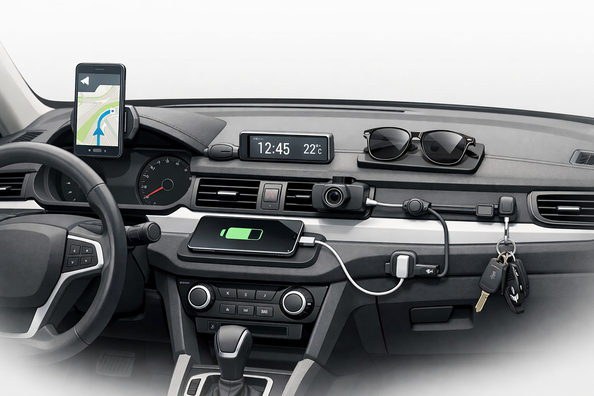

Clutter on the dashboard usually isn’t caused by a lack of accessories, but by poor storage logic: the phone, glasses, keys, and cards end up on the nearest flat surface. When the dash is smooth, sloped, or heats up in the sun, small items start sliding, rattling, and constantly shifting from place to place.
If you want to fix this without drilling and without adding yet another bulky box, what works isn’t universal bins but precise solutions matched to the dash geometry: a vehicle-specific dashboard shelf organizer or a hidden compartment behind the screen. But only if they’re selected for your car’s model year, dash configuration, and screen size.
The instrument panel isn’t designed to be a permanent shelf for small items. In many cars there are few factory storage pockets, or they’re inconveniently placed, so things naturally migrate to the top, closer to your hands.
Then the cabin design itself comes into play. The dashboard often has complex contours, slopes, seams, trim inserts, and textured plastic. Because of this, any universal organizer or mat either won’t sit flush or will start to move—especially in hot weather.
A separate cause is trying to solve the issue with a large box on the dashboard. Technically you get more space, but visually the dash looks even heavier, and access to items isn’t always more convenient.
First, clear everything off the dashboard and watch for a few days what returns there. If only 2–3 items come back, you need a compact solution for them. If the dash fills up again with random odds and ends, the problem isn’t space—it’s the habit of tossing everything there.
Next, do a dry fit of the future accessory without final mounting. Verify the model year, trim level, dash shape, presence of a center speaker, screen size, and how the shelf edge follows the dash geometry.
Another simple test is temperature. If the accessory fits tight in the morning but develops play after sitting in the sun, the issue is usually the material, the adhesive base, or an imprecise fit. If the shelf stays stable and only the items slide, an anti-slip insert or a different compartment format is enough.
DD Tuning expert comment: The most common mistake is searching only by the car model name and not checking the dashboard, screen, and facelift. The second typical mistake is trying to solve it with a universal shelf and then stuffing shims under it. If the accessory doesn’t match the dash geometry from the start, small tweaks rarely deliver a proper result.
| Symptom | Likely cause | What to do |
|---|---|---|
| Phone and keys constantly slide around on the dashboard | No dedicated spot or a slippery surface | Install a vehicle-specific shelf or a compact hidden compartment; for light items, an anti-slip insert is sometimes enough |
| The shelf squeaks or rattles over bumps | There’s play, an imprecise fit, or missing soft pads | Do a re-fit, verify compatibility, add thin felt or foam pads at contact points |
| The accessory doesn’t sit flush at the edges | Different dash version, different screen, or a facelift | Don’t force-glue it; look for the exact version for your configuration |
| After heat, the accessory started moving | Adhesive fixation weakened or the plastic overheats | Clean and degrease the surface, refresh the mounting, don’t install on dirty or polish-treated plastic |
| The shelf is there, but the phone doesn’t sit securely | Not deep enough or a poor format for heavy items | Use it for glasses, cards, and small items, and look for a deeper vehicle-specific option for the phone |
A vehicle-specific dashboard shelf organizer that follows the shape of the dash works best. It doesn’t require drilling, usually installs in a few minutes, and doesn’t turn the dashboard into a separate box. If the vehicle design allows it, a hidden compartment behind the screen looks even cleaner: items are within reach but not left in plain sight.
The second key point is surface preparation. Even a good shelf can move if it’s installed on dust, polish, or hot greasy plastic. Before installation you need cleaning, a dry fit, and checking the contact points.
The third thing that truly works is soft pads at contact areas and an anti-slip liner inside. They won’t fix poor compatibility, but they do remove minor noise and keep glasses or cards from tapping against plastic.
A universal shelf without proper matching rarely gives a clean result. It may seem fine for the first week, but then play, misalignment, or the visual feel of a foreign part on the dash appears.
Weak double-sided tape as the only mounting method also won’t save you if the base doesn’t match. In heat it holds worse, and on a textured surface it won’t make even contact.
Trying to install a version for another year or another screen also doesn’t give a proper effect. From the outside it looks like a small difference, but in practice a few millimeters are enough for the accessory to squeak or sit under tension.
An accessory makes sense when the dashboard itself is intact, but it simply lacks a functional spot for everyday items. In that case, the most logical option is to look at dashboard shelves: this format is designed for a phone, glasses, cards, and small items without drilling and without a big box on top.
If you don’t have many items and the only issue is sliding, sometimes a sticky mat is enough. It’s cheaper, but works only for light items and doesn’t replace a full shelf when you need real organization.
If the mess isn’t limited to the dashboard and spreads across the entire front of the cabin, it’s worth reviewing interior accessories and assigning small items to their own zones. But if the dashboard itself is deformed, has broken mounts, or misaligned trim pieces, fix that core problem first: no organizer will sit properly on a crooked base.
| Solution | When it works | When it’s not worth spending money |
|---|---|---|
| Vehicle-specific dashboard shelf | You need space for 2–5 everyday items, the dash is intact, compatibility confirmed by model year and configuration | If it’s bought at random without checking the screen, facelift, and dash geometry |
| Hidden compartment behind the screen | You want to hide items from view and avoid visually loading the dashboard | If the specific version isn’t compatible with your screen or the module shape changed after a facelift |
| Anti-slip insert or sticky mat | You only have a phone, card, or glasses and don’t need a separate compartment | When there are many items, they’re heavy, or you need real sorting—not just grip |
| Felt or foam pads | The fit is correct, but there’s light noise at contact points | If the accessory doesn’t fit the shape from the start and is held only by shims |
| Replacing damaged dashboard elements or mounts | The base is warped, damaged, or has play on its own | If the dashboard is intact and the only issue is that there’s nowhere for items to go |
From a customer’s experience: someone was looking for a way to remove a phone, glasses, and a pass from the dashboard, but didn’t want to drill the dash and didn’t want a big box on top. After a test fit, they отказалися from a universal organizer and chose a vehicle-specific shelf for their dashboard configuration. As a result, small items stopped sliding, and the dashboard looks factory—without the feel of a homemade add-on.
To clear dashboard clutter without drilling, first identify the real cause: lack of space, items simply sliding, or an incompatible accessory. The best result is usually delivered by a vehicle-specific shelf or a hidden compartment, selected precisely for the model year, screen, and dash shape. Universal boxes, weak mounting, and attempts to adapt an accessory from another vehicle version more often add noise and visual clutter. This material is based on real selection experience, practical work, and real usage scenarios—not theoretical advice.
Shipping to EU
Wholesale and retail
Own warehouse
Опис продукту
Подарунки не надаються при оформленні покупки у кредит під 0,01% або при покупці частинами.